
WooCommerce stores built beyond the standard storefront.
We design, build and extend WooCommerce systems around the complete order workflow—from products and checkout to payments, delivery, integrations and internal operations.
Payment confirmed
ReadyCourier label
SyncedBuild the store and its operational foundation together.
Architecture, catalog, storefront, checkout, payments, delivery, integrations and launch configuration.
Review new-store capabilities →Improve what exists without rebuilding everything blindly.
Audit, redesign, custom functionality, integration work, conflict investigation and controlled technical changes.
Review common existing-store problems →Development across the complete commerce system.
The required combination depends on the store, catalog, order volume, integrations and internal processing model.
Store architecture & storefront
Structure the store around how visitors browse, compare and purchase.
- Catalog and navigation architecture
- Responsive storefront implementation
- Product and category templates
- Conversion paths and account experience
Catalog, pricing & product logic
Represent commercial rules that standard product fields cannot cover.
- Complex product structures
- Conditional pricing and discounts
- Bundles, quantities and restrictions
- Custom product data and calculations
Checkout & payment customization
Make checkout behavior follow delivery, customer and payment requirements.
- Conditional fields and validation
- Payment availability rules
- Shipping and location logic
- Classic Checkout and Checkout Blocks
ERP, courier & billing integrations
Connect WooCommerce with the systems that continue processing the order.
- External APIs and web services
- Stock, product and order synchronization
- Labels, tracking and fulfillment data
- Invoices, statuses and error handling
Order & customer operations
Give operators the context and actions required after checkout.
- Custom order screens and metadata
- Bulk actions and status workflows
- Customer context and internal notes
- Controlled automation and exceptions
Custom WooCommerce plugins
Build the missing functionality when generic extensions cannot represent the requirement safely.
- New WooCommerce extensions
- Admin tools and workflow modules
- Plugin integrations and extensions
- HPOS-aware maintainable development
The checkout should represent the business rules—not work around them.
Checkout is where catalog, customer, payment, delivery and operational constraints meet. Small workarounds here often become repeated manual work after every order.
Required fields, identity data, account or guest behavior and validation.
Quantity limits, combinations, dimensions, special handling and eligibility.
Courier, destination, pickup, price and service availability.
Conditional gateways, COD rules, fees, deposits and manual review.
Shipping zone matched
PASSProduct restrictions checked
PASSCOD requires operator review
REVIEWWooCommerce should not become an isolated system.
Re-entering the same order, stock or customer data in several applications increases delay and creates more places where information can become incomplete or inconsistent.
Clear source of truth
Define which system owns each type of data before synchronizing it.
Controlled synchronization
Handle status changes, retries, duplicate prevention and partial failures.
Operator visibility
Make integration status and exceptions understandable inside the workflow.
Maintainable responsibility
Avoid several plugins trying to own the same data or event.
Order processing should give the team context, actions and controlled exceptions.
The order screen is often where payment, customer, courier, inventory and fulfillment information must be reviewed together.
Important metadata, customer history and integration status in one place.
Controlled actions for groups of orders without repeated manual navigation.
Transitions and side effects that match the actual fulfillment process.
Clear review paths when an automated step cannot complete safely.
Manual review required before fulfillment.
Workarounds become expensive when they are repeated on every order.
Custom development is not the default answer. It becomes useful when the current combination of settings and extensions cannot represent the requirement reliably.
Several plugins control the same checkout behavior.
Responsibilities overlap, settings conflict and updates become difficult to predict.
The team re-enters order data in other applications.
Daily CSV files and repeated copy-paste indicate a missing integration or internal workflow.
The store cannot represent the commercial rules.
Pricing, delivery, payment or product constraints depend on manual corrections after checkout.
An existing integration loses or duplicates data.
Retries, ownership, synchronization direction and error visibility may not be defined clearly.
Operators lack the information required to process orders.
Important customer or fulfillment context is distributed across notes, exports and external tools.
Every update creates fear of breaking the store.
The implementation may contain fragile overrides, unowned custom code or incompatible extensions.
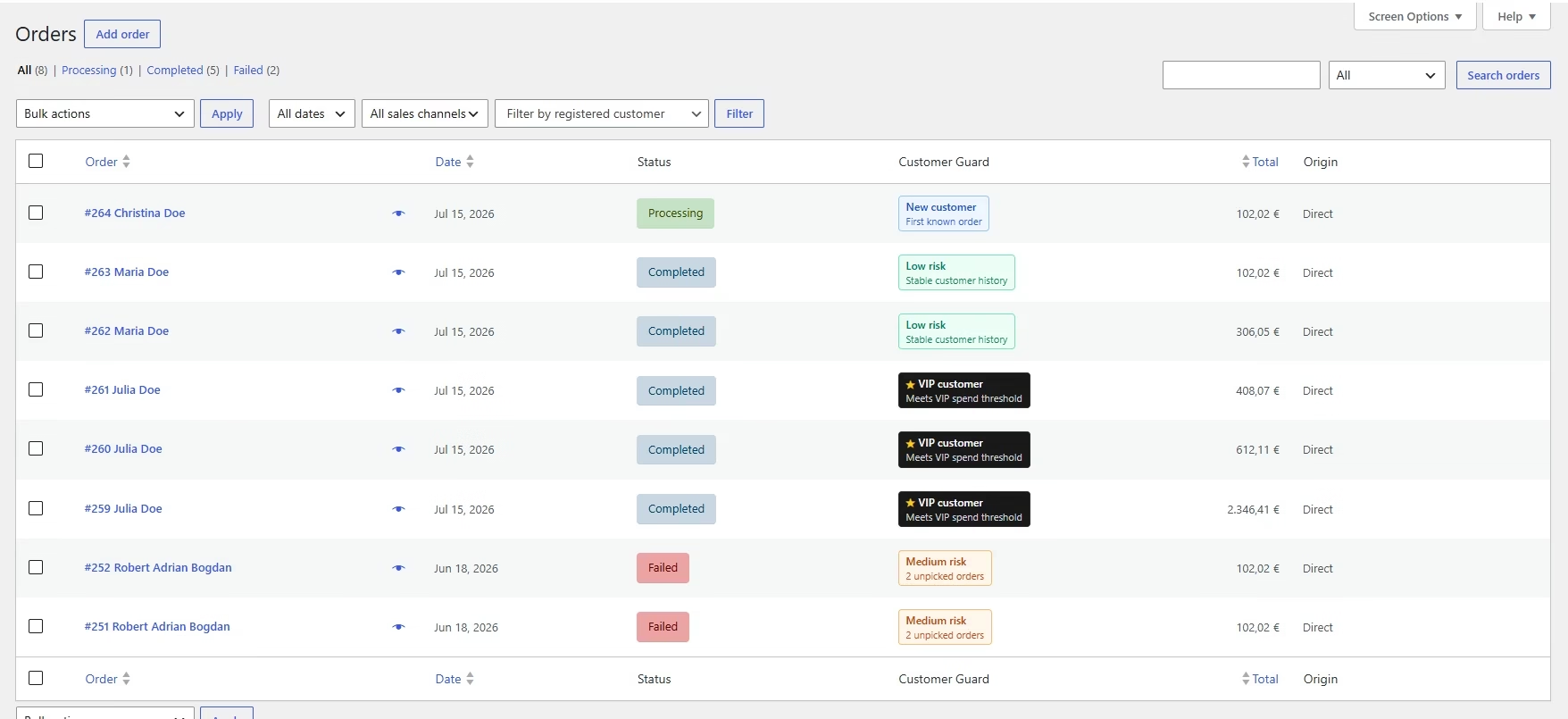
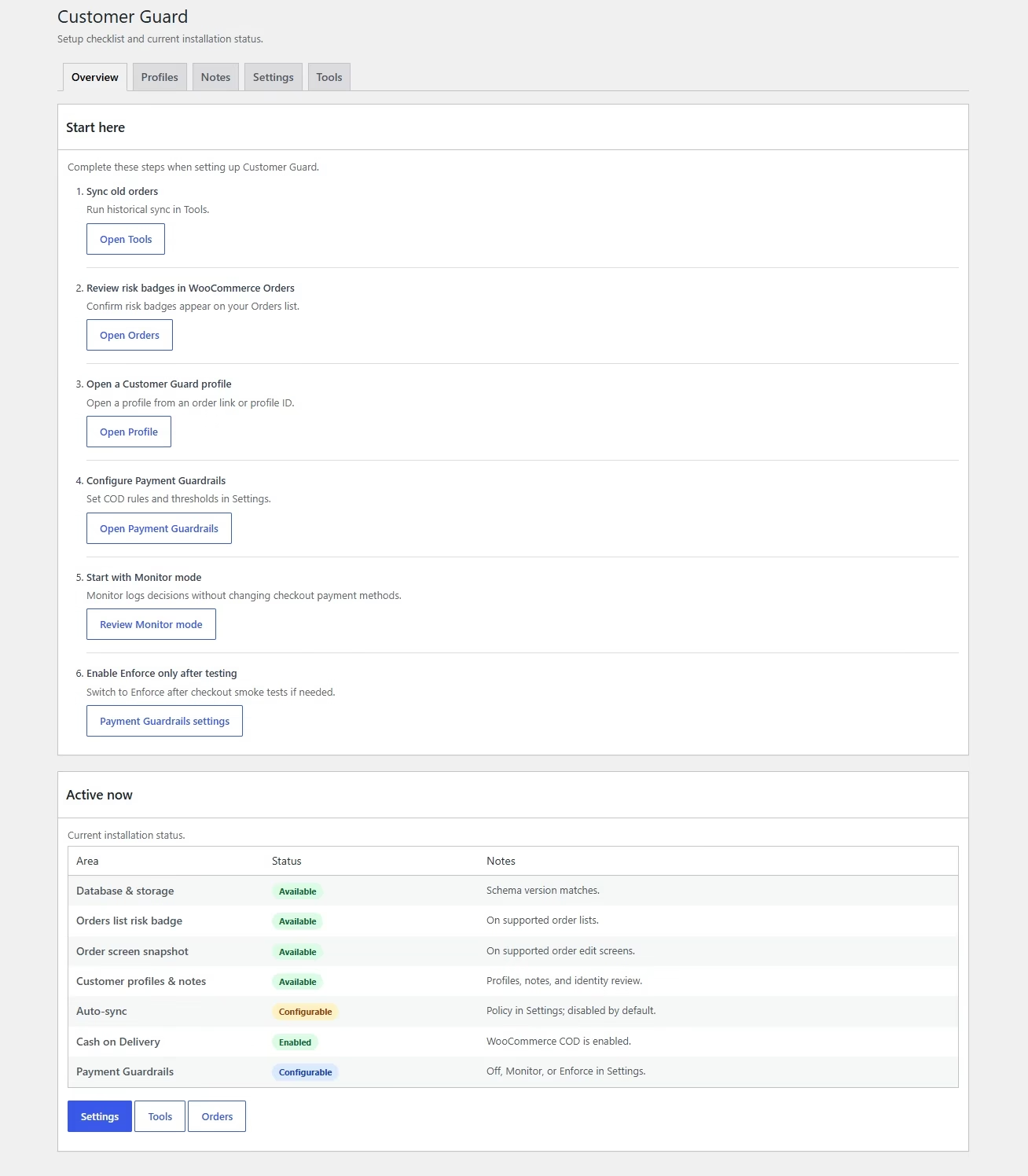

Customer Guard demonstrates the type of operational layer we can build.
It creates internal customer profiles from WooCommerce order history, adds operational context to Orders and supports controlled payment rules for risky COD workflows.
Customer profiles generated from registered and guest-order history.
Operational badges and an order snapshot inside WooCommerce admin.
Payment Guardrails with Monitor and Enforce modes.
WooCommerce compatibility including HPOS and Checkout Blocks.
The technical plan begins with the order workflow.
For an existing store, the process may begin with an audit. For a new store, it begins with discovery, architecture and a clear first-release boundary.
Understand the store, users and current constraints.
Catalog, checkout, payments, delivery, order processing, integrations and maintenance responsibility.
Describe how the order should move through the business.
Normal paths, exceptions, ownership, external systems and required operator decisions.
Choose what to configure, retain, integrate or build.
Define technical boundaries, dependencies, risks, milestones and acceptance criteria.
Implement in controlled stages.
Checkout, order, integration and compatibility behavior are tested against the agreed workflow.
Deploy, verify and maintain the production flow.
Final configuration, observation, corrections and future improvements remain under technical context.
A working checkout must remain a working checkout after updates.
Ongoing support can cover compatibility, integrations, recovery, investigation and controlled development after the initial project.
Before discussing a WooCommerce project.
The exact scope depends on the existing system and required workflow, but these answers clarify how we approach common requests.
Can you work on an existing WooCommerce store?
Yes. Existing-store work can begin with an audit of the current implementation, plugin responsibilities, checkout behavior, integrations and the specific problem that needs to be corrected or extended.
Do you develop custom WooCommerce plugins?
Yes. We can build standalone plugins, internal workflow modules, integrations or extensions for existing WooCommerce behavior when generic products do not fit the requirement.
Can WooCommerce be integrated with an ERP, courier or billing platform?
Yes, provided the external system offers a usable integration method such as an API, web service, documented import/export process or another reliable data-exchange mechanism.
Do you work with WooCommerce Checkout Blocks?
Yes. The required checkout implementation is evaluated against Classic Checkout, Checkout Blocks and the compatibility of the payment, shipping and custom logic involved.
Can several plugins be replaced by one custom solution?
Sometimes. We first identify what each plugin currently owns, what can be removed safely and whether a focused custom implementation would reduce overlap and long-term maintenance cost.
Do you provide support after launch?
Yes. Support can include updates, compatibility checks, issue investigation, integration monitoring and further development under the same technical context.
How is a WooCommerce project estimated?
Estimation follows requirement discovery. We need to understand the current platform, catalog, checkout, integrations, order workflow, constraints and the boundaries of the first release before producing a responsible scope.
What is preventing the WooCommerce system from working as the business needs?
Describe the store, the current workflow and the functionality, integration or correction that needs to be built.