
 EBA Customer Guard
Know more about the customer before processing the next risky order.
EBA Customer Guard helps WooCommerce stores reduce operational losses caused by unpicked parcels, repeated returns and risky Cash on Delivery orders by adding customer history, internal risk context and controlled payment rules directly inside WooCommerce.
Confirmed profile
MatchedConfigured rule
ReviewEvery unpicked Cash on Delivery parcel creates a cost before the product returns to stock.
The loss can include outbound delivery, return transport, packaging, operator time, blocked inventory, possible product damage and delayed resale.
A Cash on Delivery order enters the normal workflow.
Inventory and operator time are committed.
The parcel travels toward the customer.
The order does not complete and the original effort is not recovered.
The parcel returns and must be received, checked and processed again.
The next decision should use the previous behavior before COD is accepted again.
Four operational layers inside the WooCommerce workflow.
The plugin turns existing order history into usable internal context and configurable payment control.
Customer identification
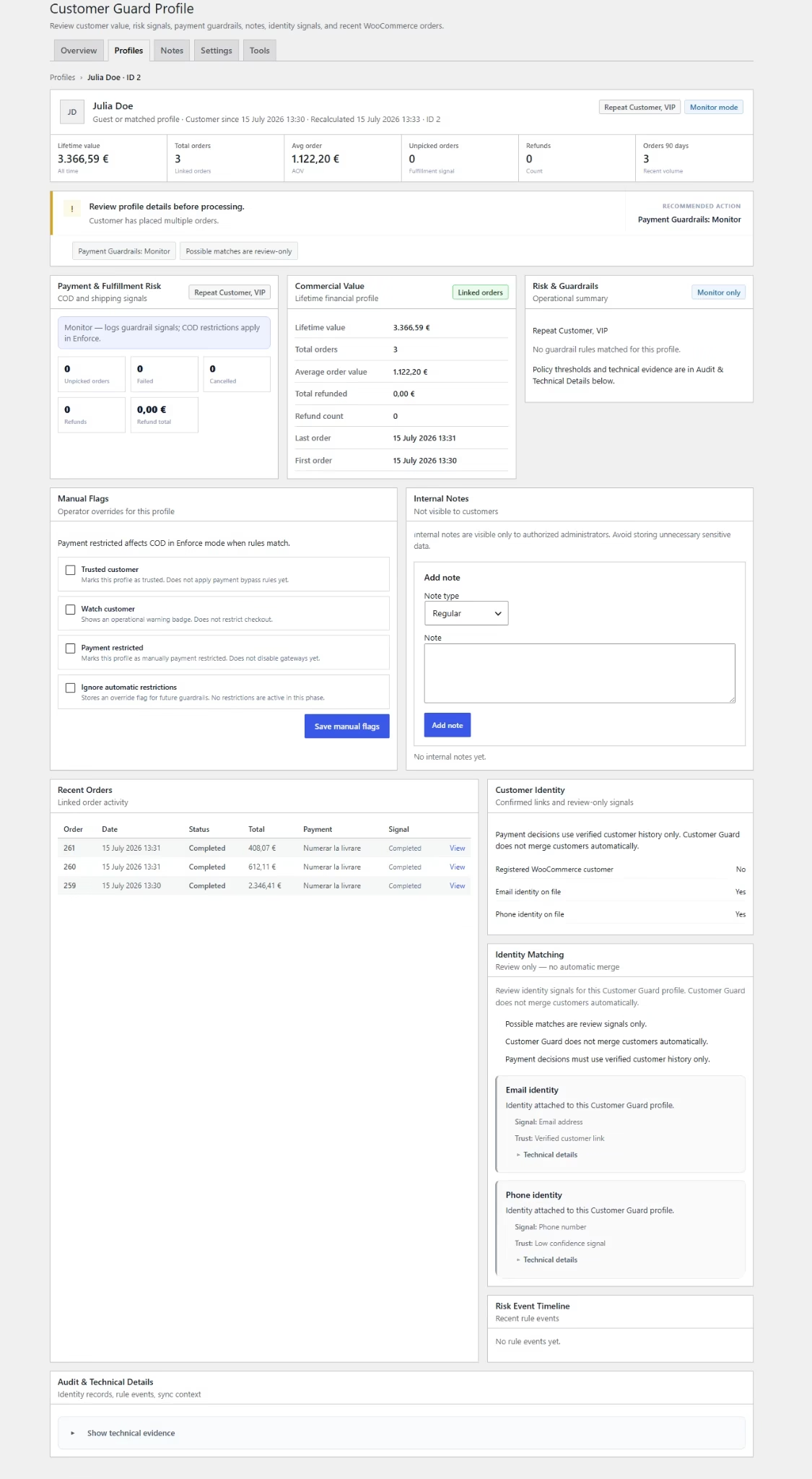
Connect registered and guest orders to an internal customer profile using confirmed identity signals.
Email · normalized phone · identity contextOperational history
See orders, spending, refunds, failed orders, cancelled orders and unpicked-order signals.
Commercial and risk historyContext inside Orders
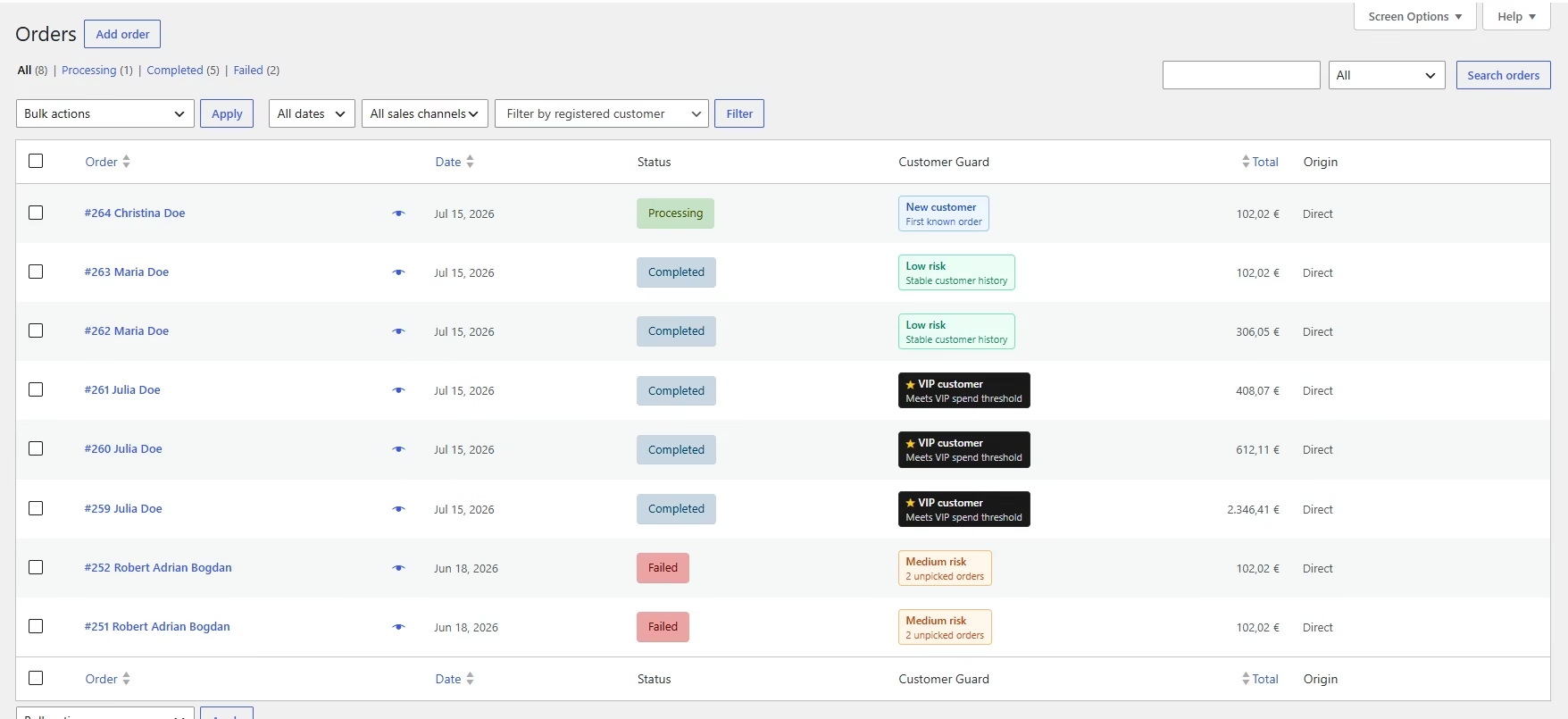
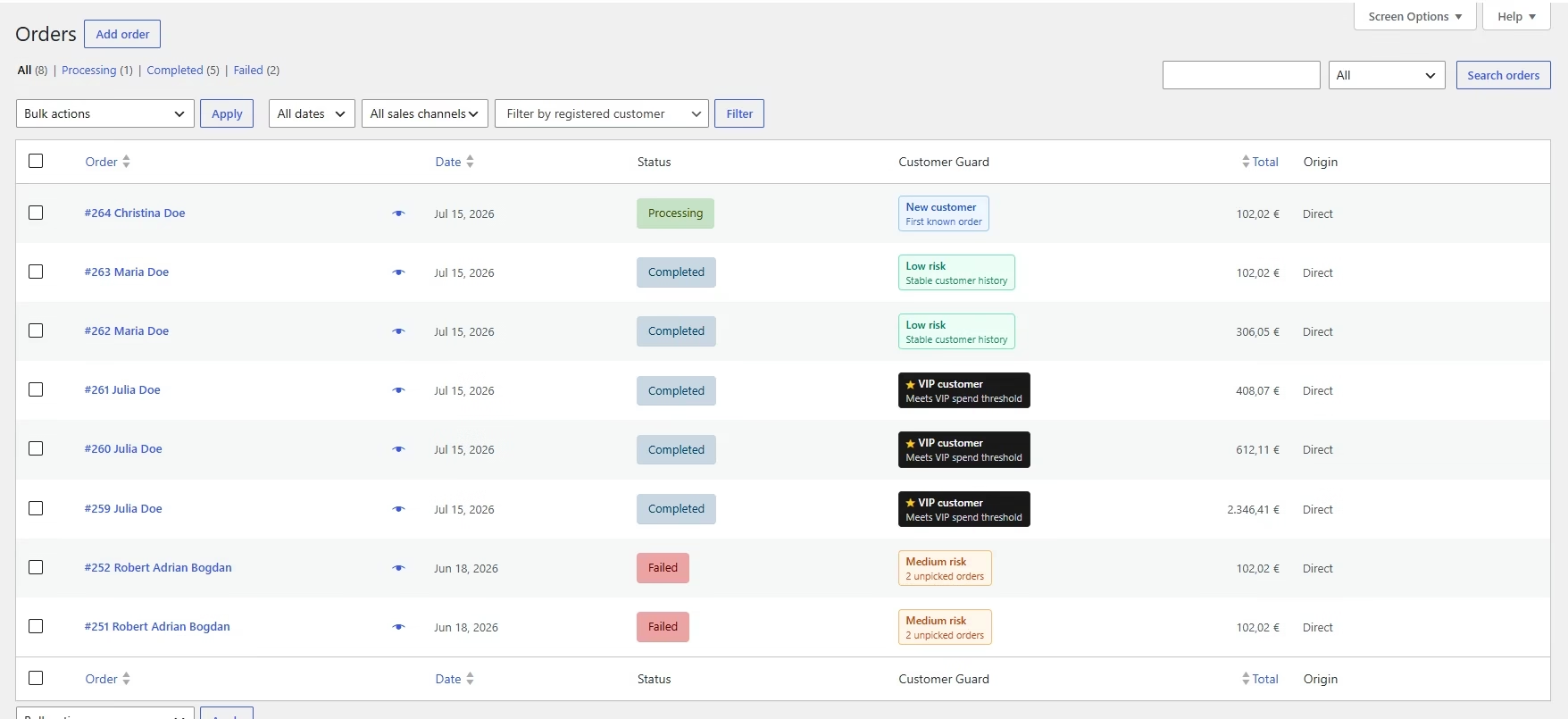
Display badges and a Customer Snapshot where the team already processes WooCommerce orders.
Less manual searchingPayment Guardrails
Monitor or restrict selected payment methods, including Cash on Delivery, according to configured rules.
Controlled, configurable behavior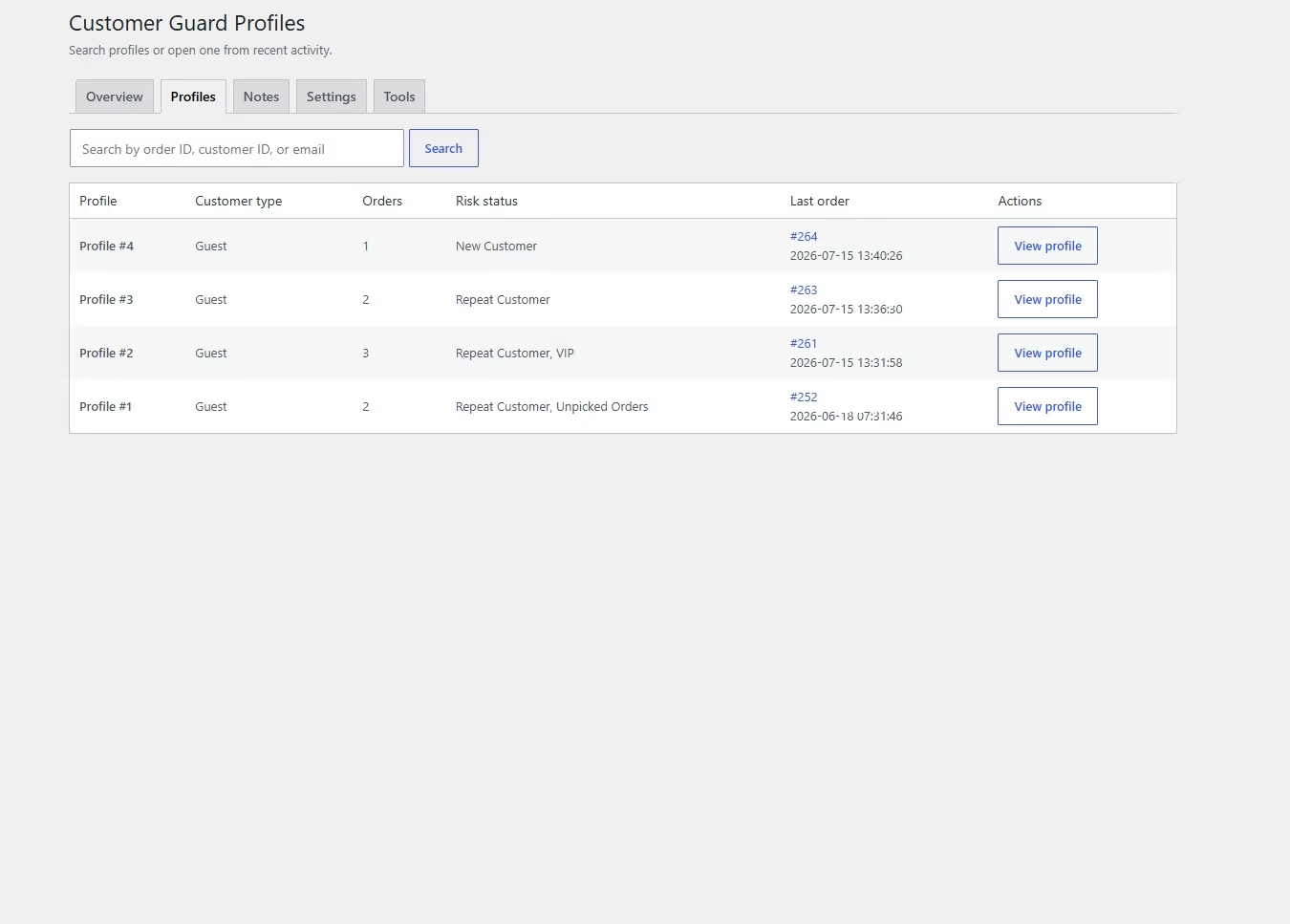
One internal customer profile built from WooCommerce order history.
Customer Guard consolidates the information operators need to understand repeat activity without turning WooCommerce into a general-purpose CRM.
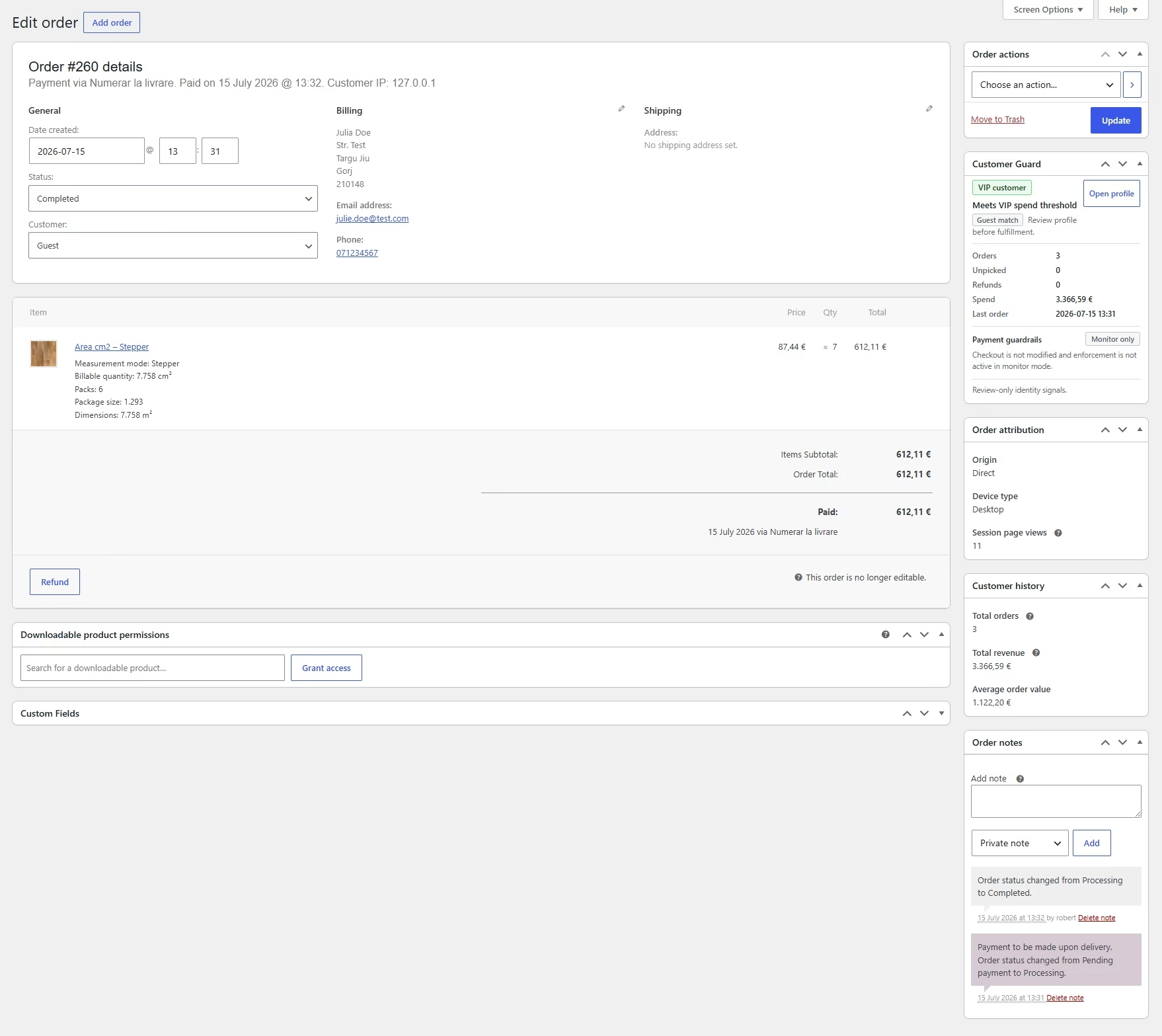
The context appears where the order decision is already being made.
The operator should not need to open several reports or search previous orders manually before processing the current order.
Notice relevant customer and payment signals quickly.
Review important history without leaving the order.
See whether a payment rule is monitoring or restricting COD.
Open the complete profile or allow COD once when justified.
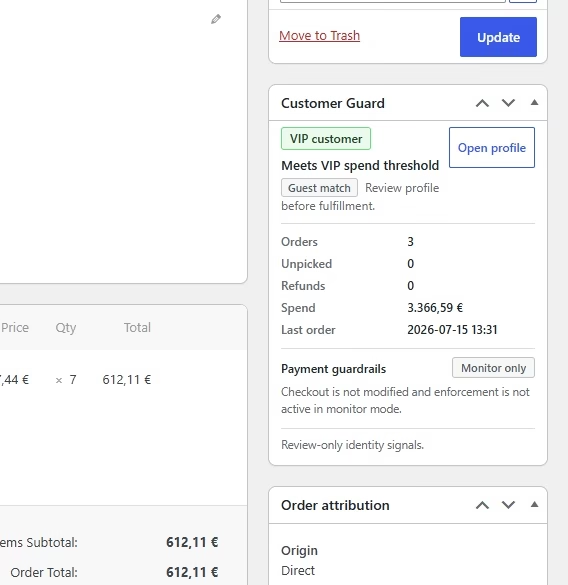
Unpicked-order evidence
Profile link available
One-time COD override
Compact signals supported by visible customer history.
Badges help the team notice relevant patterns quickly. The underlying customer history remains available for review.
Quickly distinguish first-time customers, known repeat buyers and valuable accounts.
Highlight behavior that may justify review or a configured COD restriction.
Manual flags and uncertain identity signals stay visible without pretending to be absolute verdicts.
Control risky Cash on Delivery workflows without blocking every order.
Rules can target selected payment gateways. The store can continue offering other valid payment methods and preserve controlled exceptions.
The configured rules run, but the available payment methods are not changed.
The selected gateway is removed when the confirmed profile meets the configured conditions.
From existing order history to the next payment decision.
Historical and future WooCommerce activity contributes to the operational profile according to the plugin configuration.
Process existing WooCommerce orders.
Build the initial customer context from historical activity.
Connect confirmed identity signals.
Registered and guest orders contribute to the appropriate profile.
Update the customer's operational history.
New orders, status changes and refunds can refresh indicators.
Place badges and the snapshot inside Orders.
The operator sees the relevant history during processing.
Monitor or enforce selected payment decisions.
Automatic action remains limited to the rules and confirmed profile conditions.
Control for normal cases, repeated risk and justified exceptions.
Customer Guard is designed to support an operator's decision—not replace every decision with one automatic verdict.
Repeat unpicked COD customer
Previous unpicked orders become visible before the next COD order is processed.
High-refund history
The profile gives the team relevant refund context before fulfillment.
Trusted customer
A known customer can bypass selected automatic restrictions.
One-time exception
An operator can allow COD once for a justified order.
Possible identity match
Uncertain signals request review rather than applying an automatic restriction.
Operational decision support—not an external customer blacklist.
Customer Guard works with the store's own WooCommerce history and remains focused on order operations and selected payment rules.
No shared global customer blacklist between stores.
No promise to eliminate every return or unpicked parcel.
No automatic identification of every false order.
No mandatory full-order block for every matched rule.
Not a general CRM, helpdesk or generic analytics platform.
Not a replacement for operator review in uncertain cases.
Built as a WooCommerce operational extension.
Customer Guard integrates with the order and checkout workflows it needs to support while keeping its responsibility focused.
Review the product on WooCommerce.com →Customer risk context integrated into the WooCommerce workflow.
The six product views below show the real administrative experience.
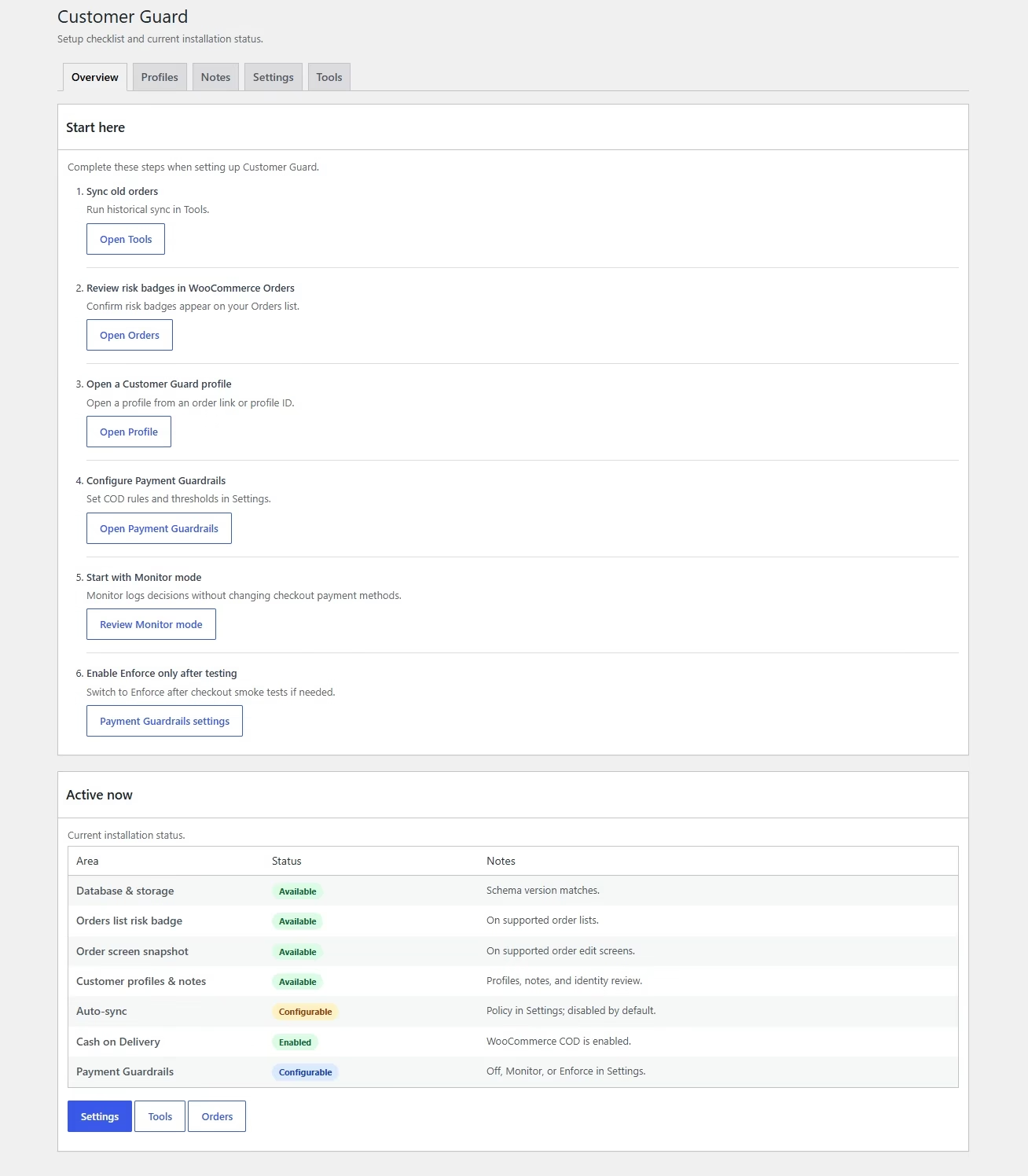
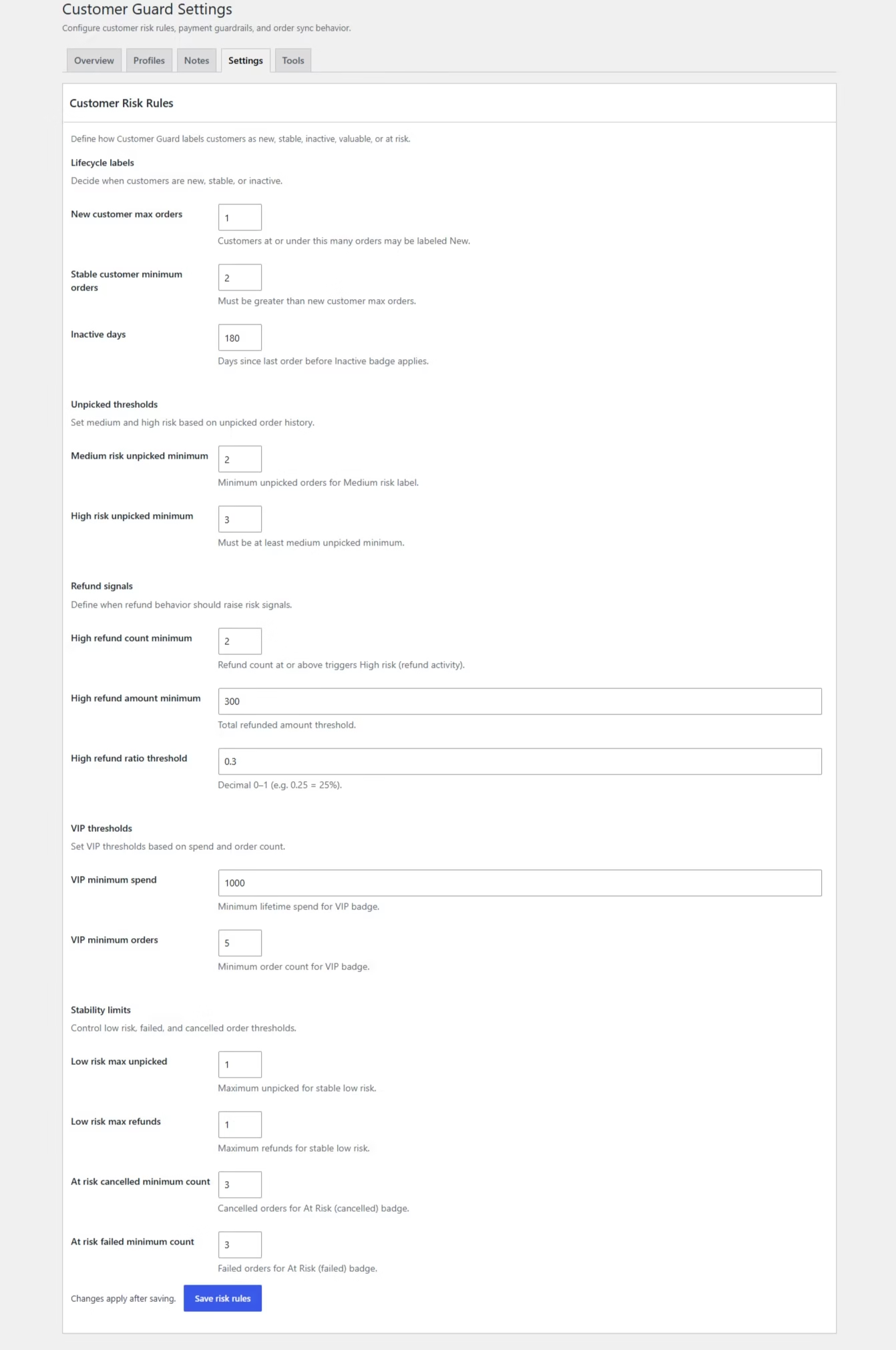
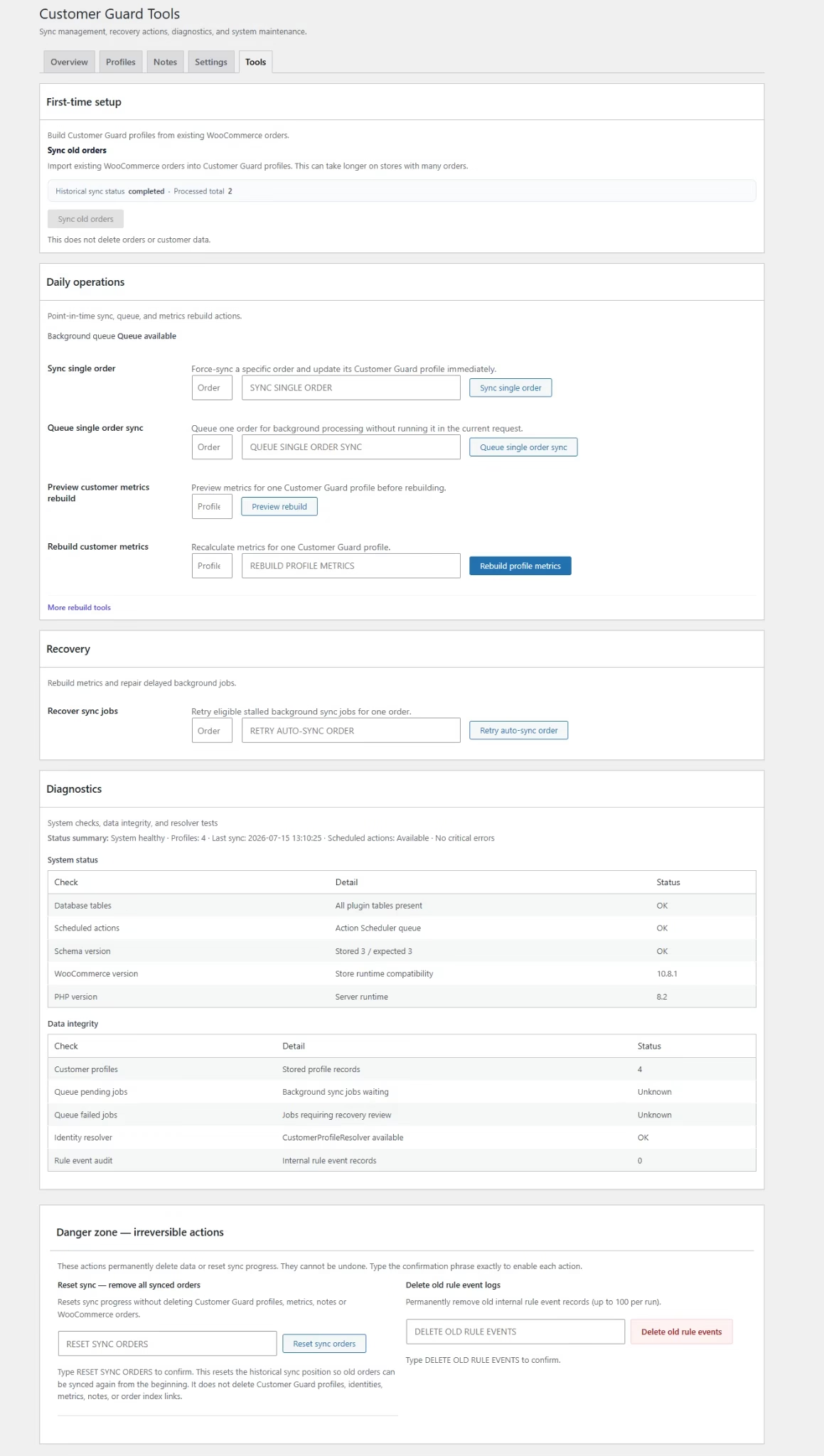
Available through the official WooCommerce Marketplace.
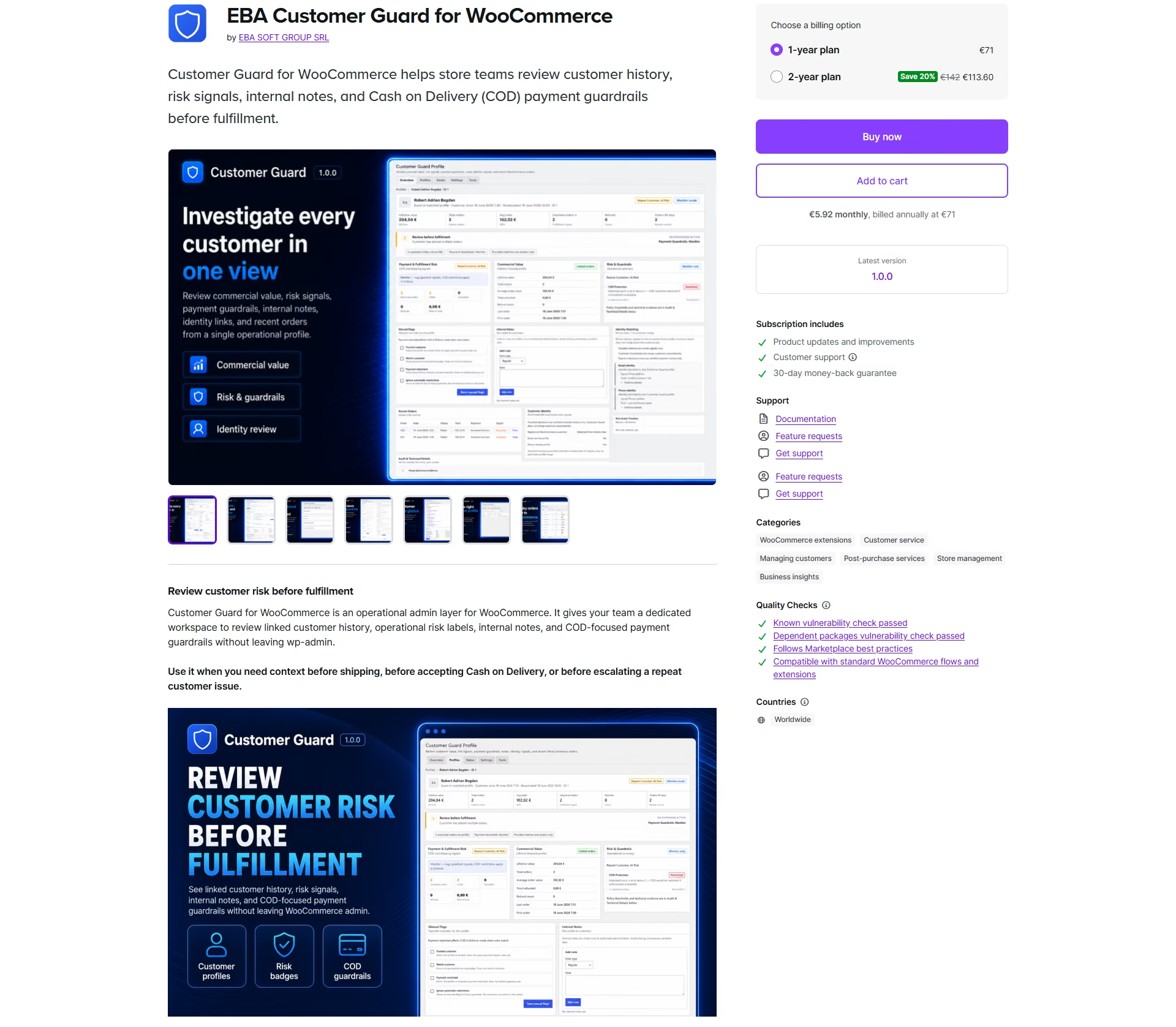
EBA Customer Guard was reviewed and published on WooCommerce.com as a commercial WooCommerce extension.
Features, purchase and product information on WooCommerce.com.
The purchase path presented on this page is the official WooCommerce.com listing.
Compatibility, documentation and future releases remain part of the product lifecycle.
Best suited to WooCommerce stores where order history can improve COD decisions.
Customer Guard is relevant when the store:
- uses WooCommerce and Cash on Delivery;
- ships physical products through couriers;
- processes orders manually or semi-manually;
- accepts guest orders;
- sees repeat customers with problematic history;
- needs rule control plus operator overrides.
The plugin may be less relevant when the business:
- does not use WooCommerce;
- accepts only prepaid orders;
- has too little order history to provide context;
- is looking for a complete CRM;
- expects a shared external customer database.
Start in Monitor Mode. Enforce rules only after reviewing their impact.
A staged rollout lets the store validate profiles and rule results before payment availability changes for customers.
Install Customer Guard.
Synchronize historical orders.
Review the generated profiles.
Configure the COD rule.
Run in Monitor Mode.
Use the simulator and Impact Preview.
Activate Enforce Mode after validation.
Keep Trusted and Allow COD once exceptions.
Before adding Customer Guard to a WooCommerce store.
These answers clarify identity matching, payment behavior, compatibility and the product boundary.
Does Customer Guard work with guest orders?
Yes. Guest orders can contribute to internal customer profiles through confirmed identity signals such as exact email and normalized phone data.
Does it use a shared customer blacklist?
No. Customer Guard uses the store's own WooCommerce order history. It does not provide a shared external blacklist between stores.
Can it completely block a customer from ordering?
The product is focused on configured payment availability, especially Cash on Delivery. It does not need to block the entire order when other valid payment methods remain available.
Can it restrict only Cash on Delivery?
Yes. Payment Guardrails can target selected gateways, including COD, according to the rules configured by the store.
What is the difference between Monitor and Enforce Mode?
Monitor Mode evaluates and displays rule results without changing payment methods. Enforce Mode applies the configured restriction when confirmed profile conditions are met.
Can an operator allow COD for one order?
Yes. The controlled “Allow COD once” override supports a justified one-time exception.
Can trusted customers bypass the rules?
Yes. A confirmed customer profile can be marked Trusted and bypass configured automatic restrictions.
How are customers identified?
Confirmed matching can use registered email, exact guest billing email, normalized phone and other confirmed identity combinations. Weaker signals remain available for review.
What happens when a customer match is uncertain?
A possible match can be shown for review. Automatic payment enforcement is limited to confirmed profiles.
Does it support HPOS?
Yes. Customer Guard is designed to work with WooCommerce High-Performance Order Storage.
Does it support Checkout Blocks?
Yes. Payment Guardrails support the WooCommerce Checkout Blocks and Store API flow as well as classic checkout.
Can historical orders be synchronized?
Yes. Historical synchronization can build the initial internal customer profiles from existing WooCommerce order history.
Does it guarantee that all unpicked parcels will stop?
No. The plugin adds context and controlled rules that can reduce operational exposure, but it cannot guarantee that every return or unpicked parcel will be prevented.
Where can the plugin be purchased?
The official product page and purchase path are available on WooCommerce.com.
Is the plugin available outside WooCommerce.com?
This page directs customers to the official commercial listing on WooCommerce.com. No alternative purchase channel is presented here.
How many orders are being processed without enough customer history?
Add operational customer context and controlled Cash on Delivery rules directly to the WooCommerce order workflow.