
Custom WordPress functionality built around the workflow it needs to support.
We develop WordPress and WooCommerce plugins, integrations and internal tools when existing products cannot represent the business requirement reliably.
Authentication
PASSData mapping
READYUse an existing plugin when it already owns the requirement correctly.
Configuration is usually the better option when the feature exists, remains compatible and does not require fragile workarounds.
- The required behavior already exists
- Settings can control it safely
- Updates remain the vendor’s responsibility
- No critical workflow is forced outside the system
Build custom functionality when the workflow cannot be represented reliably.
A focused plugin becomes justified when manual work, overlapping tools or an external system must become one controlled flow.
- Business rules require dedicated logic
- Data must be validated or transformed
- Operators repeat the same manual process
- Long-term ownership must become explicit
Plugins, tools and integrations with a clear responsibility.
The implementation can be a standalone plugin, an extension of an existing workflow or a private tool used only inside the organization.
WooCommerce workflow plugins
Custom logic for products, customers, orders and fulfillment.
- Order metadata and operational context
- Status transitions and controlled actions
- Bulk tools and exception handling
- Customer and fulfillment workflows
Checkout & payment extensions
Rules for fields, shipping and payment options.
- Conditional checkout fields
- Gateway availability rules
- Delivery and destination validation
- Checkout Blocks and Store API
WordPress administrative tools
Internal screens and workflows that reduce repetitive work.
- Custom admin pages and forms
- Filters, search and bulk actions
- Roles, permissions and review flows
- Operational reports and settings
API & system integrations
Reliable data movement between WordPress and external platforms.
- Authentication and data mapping
- Retry and duplicate prevention
- Error logging and operator visibility
- ERP, courier, billing and CRM
Import, export & synchronization
Controlled processing of products, customers, orders and structured data.
- Scheduled and manual imports
- Validation and transformation
- Progress, errors and retries
- Historical data processing
Commercial WordPress products
Plugins prepared for distribution and continued releases.
- Product architecture and onboarding
- Settings and documentation
- Licensing or marketplace preparation
- Release and maintenance workflows
WooCommerce functionality that continues beyond the product page.
The most valuable custom logic often appears after product selection: checkout rules, payment behavior, order processing, customer context and integrations.
Custom data, calculations, restrictions and pricing rules.
Fields, validation, shipping, payment and Store API behavior.
Metadata, actions, status workflows and operational support.
Profiles, matching, history and internal team context.
Validate configuration PASS
Calculate custom price READY
Shipping rule matched PASS
Payment requires review REVIEW
Order#18491Processing
ERP synchronization SYNCED
A custom plugin can be an internal application—not only a public feature.
WordPress admin can support structured review, data processing, configuration and operational actions without exposing those workflows publicly.
Purpose-built admin screens
Show only the information and actions required for the workflow.
Filters and bulk actions
Reduce repeated navigation and process groups of records safely.
Permissions and review control
Restrict sensitive actions to appropriate roles and capabilities.
Logging and audit context
Make important automated and manual actions understandable later.
Moving data is easy. Moving it reliably is the real integration work.
A production integration must define ownership, transformation, retries, duplicate prevention, errors and what operators see when an external system is unavailable.
Credentials, token refresh, permissions and protected storage.
Translate fields, formats, statuses and identifiers.
Retries, idempotency and partial-failure handling.
Logs, health status and actionable exceptions.
Authentication PASS
Last synchronization SUCCESS
Pending retry 1 ITEM
We should earn the custom-development decision before writing code.
A custom plugin creates ownership and maintenance responsibility. The decision should be based on the workflow, not on a preference for custom code.
Can one existing plugin solve the requirement safely?
Configuration is preferable when the feature already exists.
Can it be extended without modifying vendor files?
Supported hooks and APIs protect future updates.
How many plugins would be required?
Overlapping tools may create more risk than one focused owner.
Who owns the data and workflow?
Responsibility must remain clear across all systems.
What happens after future updates?
The solution needs an explicit compatibility path.
What is the long-term operational cost?
Manual work and repeated workarounds belong in the decision.
Define the responsibility before defining the code.
Normal behavior, exceptions, data ownership and future maintenance become explicit before implementation.
Understand the workflow and users.
Current process, manual actions, data and expected results.
Describe behavior and exceptions.
Inputs, outputs, permissions, states and acceptance criteria.
Define boundaries and responsibility.
Storage, events, APIs, migrations and failure handling.
Implement in controlled stages.
Core behavior, admin interface and integrations.
Verify workflow and compatibility.
Automated checks, manual scenarios and edge cases.
Configure and verify production.
Migration, logging, documentation and launch checks.
Keep the plugin useful.
Updates, investigation and future release responsibility.
The plugin should behave safely when conditions are not ideal.
The exact quality gates depend on scope, but security, compatibility, data integrity and controlled failure behavior are considered during planning.
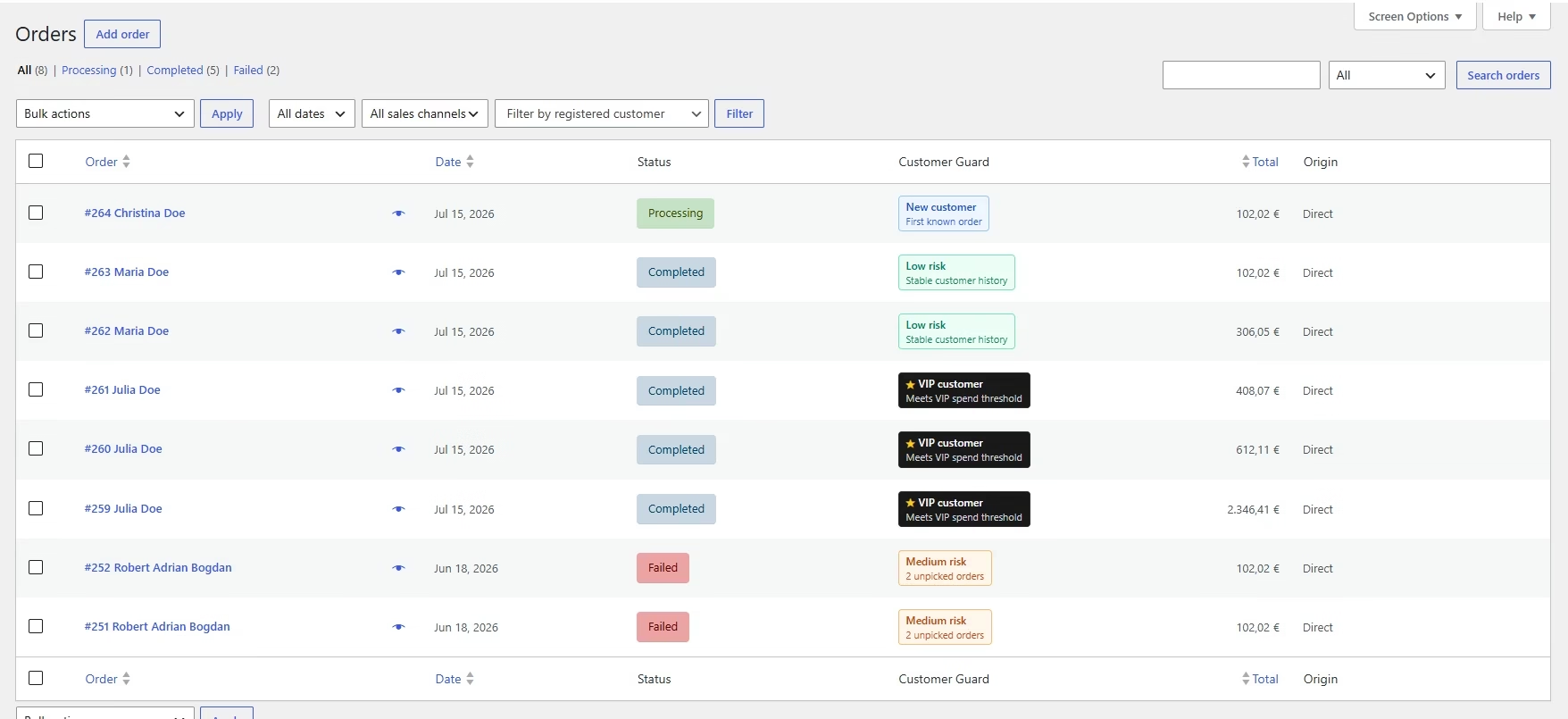

From an operational requirement to a complete WooCommerce product.
Customer Guard combines customer identity, order history, administrative context and payment rules inside WooCommerce.
Internal customer profiles from registered and guest history.
Identity matching using confirmed and review-level signals.
Order admin integration with badges and snapshots.
Payment Guardrails across classic checkout and Blocks.
Historical synchronization and profile rebuilding.
Marketplace release and continued maintenance.
A useful plugin request describes the workflow—not only the desired screen.
These questions help define responsibility and reduce assumptions during estimation.
WordPress setup, plugins, custom code and external platforms.
Customers, operators, administrators or external systems.
Repeated steps, exports, review and exception handling.
Fields, identifiers, ownership and update direction.
Trigger, validation, processing, result and feedback.
Invalid data, external failure or sensitive decisions.
Before starting custom plugin development.
The final scope depends on the workflow and current platform, but these answers clarify the approach.
Can you develop a completely new WordPress plugin?
Yes. The result can be a private internal plugin, a client-owned extension or a product prepared for distribution.
Can you extend an existing WooCommerce plugin?
Yes, when it provides suitable hooks, APIs or supported extension points.
Do you modify third-party plugin files directly?
Normally, no. Separate extensions and supported hooks are safer for future updates.
Can the plugin integrate with an external API?
Yes, provided the service exposes a usable integration method. Scope must include authentication, mapping, retries and errors.
Who owns the custom plugin source code?
Ownership and usage rights should be defined in the project agreement.
Can you work with HPOS and Checkout Blocks?
Yes. Compatibility is evaluated wherever the plugin interacts with orders or checkout.
Do you provide maintenance after delivery?
Yes. Maintenance can include compatibility updates, fixes, API changes and future features.
Can a plugin be prepared for commercial distribution?
Yes. This can include product architecture, onboarding, documentation, release packaging and marketplace preparation.
How is custom plugin development estimated?
After discovery of users, data, behavior, exceptions, integrations and the first-release boundary.
What functionality is currently missing from the WordPress system?
Describe the workflow, users, data and the result the plugin should produce.